Personalised Unified Profiles: The Missing Piece of Your Data 360 Demo
Let's be honest - the basics of Data 360 rarely excite anyone. Here's what does, and how to personalise it for every client.
Introduction
I did a lot of Data 360 (Data Cloud) demos, I attended Salesforce events, I observed the audience, I saw what’s working & what wasn’t. Every time I tried to improve my presentation and adjust to the listeners. Let’s be honest, the basics of Data 360 isn’t interesting unless you are really into data. Often we present to business stakeholders who don’t care much about the difference between a Data Lake Object and a Data Model Object. They “fall asleep” before you reach the Identity Resolution part. I would like to inspire you to improve your Data 360 demoing & help your clients to understand the technology much better.
What makes clients’ eyes shine
When we present the Marketing Cloud Demo, marketers can identify with the system - they use or used something similar, they recognise similarities and they can assess the technology. From my experience, Customer Data Platform is still quite a new idea for customers and it’s really difficult to engage them. The Unified Profile is the “final story” of Data 360, something that anyone will understand, no matter if you are CMO, Marketing Specialist or Customer Service Consultant. But does it really work when we show the “Formula 1” use case or any other Salesforce’s Success Story? In my opinion, partially.
I noticed one thing that really made clients’ eyes shine - Unified Profile.
Unified Profile, in short
Before we go further, let me remind you in short, what Unified Profile is. Based on the data we feed Data 360, unify (Identity Resolution) & enrich with the data we “add” (Calculated Insights), we can build a 360 profile of our customer. Profile that will include significant data combined in one place. That profile, then can be used across your entire Salesforce ecosystem, for example by Sales, Service or Marketing.
The typical Data 360 demo
From my observation, demos usually look like this: you go through the general idea of what Data 360 is, show the system and cover the most important capabilities. Then you connect demo with Marketing Cloud Next, maybe Agentforce. It sometimes differs, but from the demos I’ve seen it’s quite similar each time. On top of that sometimes there are slides - maybe a Unified Profile built in PowerPoint. As I mentioned, in my opinion it’s hard to make fireworks out of a Customer Data Platform, especially when we speak to business. But the Unified Profile is very hard to build quickly, directly in the demo environment - and without real data, it doesn’t look great. I found a relatively quick way to build a realistic, personalised Data 360 Unified Profile, and I hope it’s going to improve your demo big time!
Please remember that the core of the demo is still your configuration. It’s the base you build the narrative on - a Personalised Unified Profile won’t do all the work for you!
Personalised Unified Profile
How can we improve our demo? How can we really show what a client can have and how it looks for their business? I started to play around and based on my experience, Salesforce materials, documentation, Unified Profiles I’ve built & specific client’s metrics, you can build a fully personalised unified profile for your client’s needs.
You usually don’t have time to build it yourself in actual demo environment or even if you have time, it’s impossible to replicate all of the data and configuration. But does it matter? We seek the outcome and the idea is to show the best Data 360 capabilities and in that way - we can completely satisfy our customers.
Please see an example below:
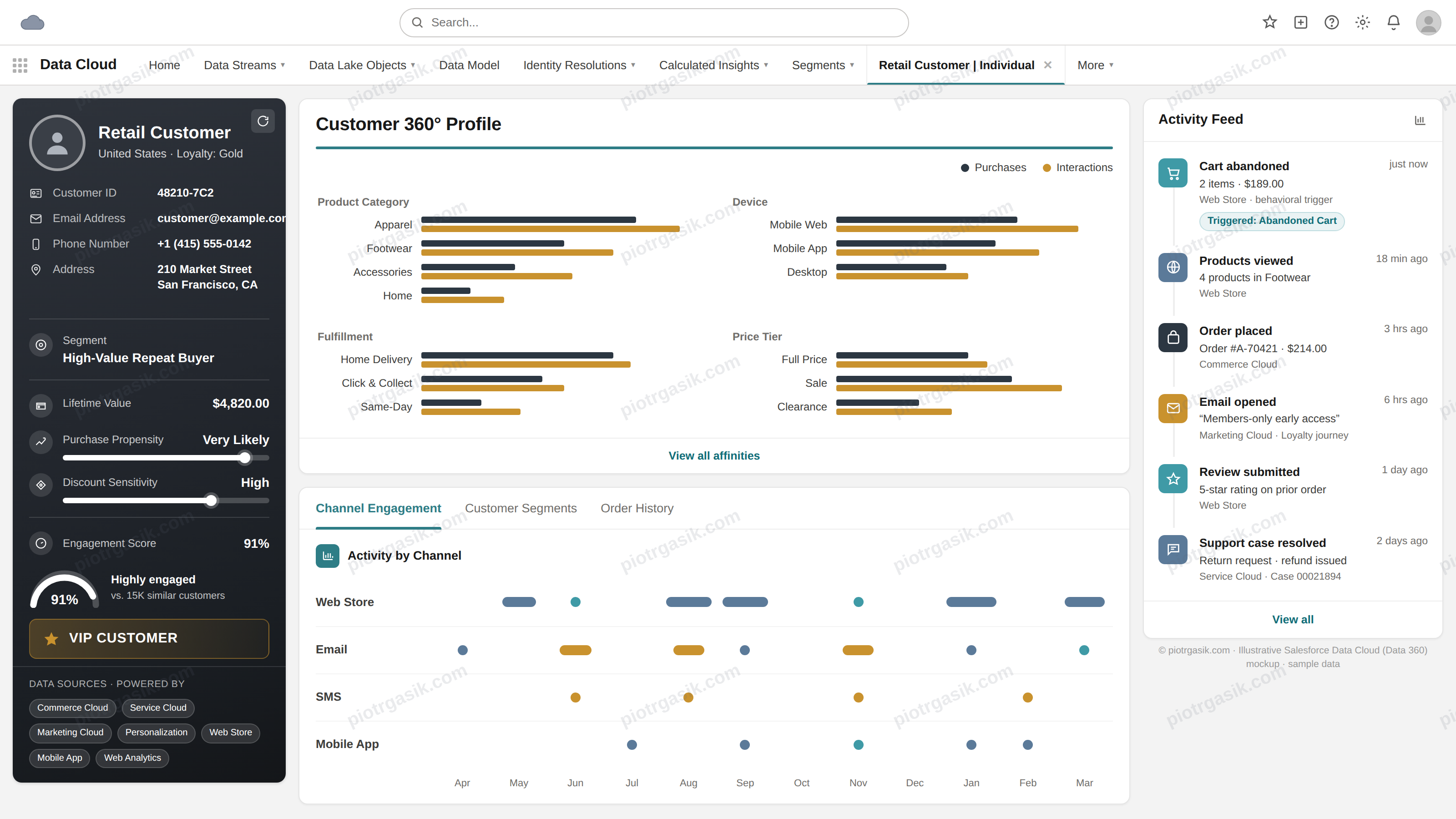
Must the example be perfect? Not necessarily. The most important thing is that it’s personalised. It has to include the information you have about your client. It needs to address their needs, problems and challenges. And.. obviously it needs to be buildable :)
Does it have to be complicated? Again, it depends! This example is simple, just to show you the idea. You’ve got complicated use case? Go for something more advanced.
Below you can see an example of B2B Unified Profile:
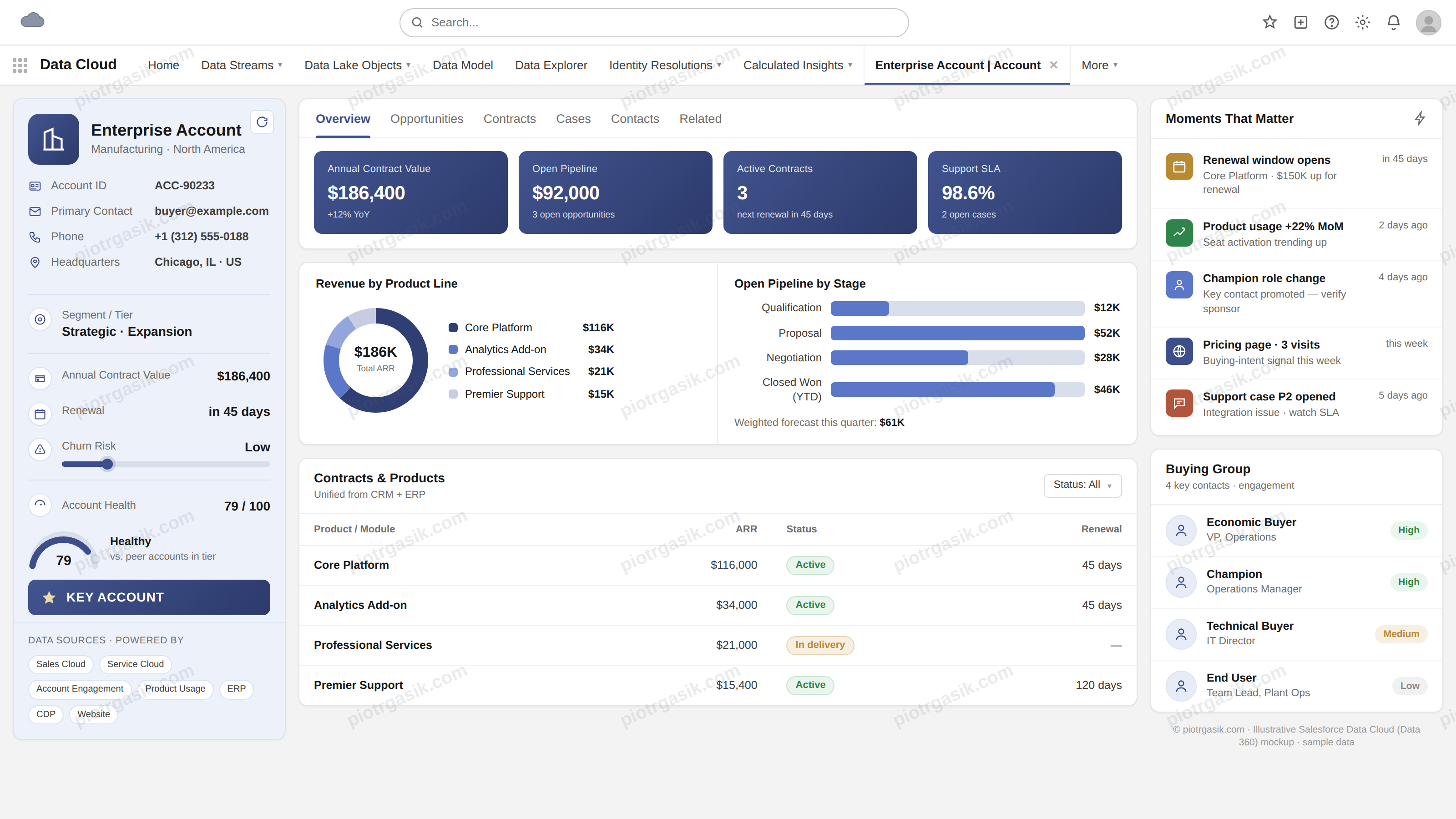
How does Personalised Unified Profile improve your demo?
The Unified profile you are going to build should reflect what client needs. It should be the final result of your entire Data 360 presentation. I see it this way: first, we go into more technical detail and the depth of the process. You show the flow of data: data ingestion, data mapping, identity resolution, calculated insights, segmentation & activation. What’s important is to make the client understand that Data 360 isn’t only about Marketing. The technology together with unified profile will positively impact all the processes you’ve built in the Salesforce ecosystem - and it can help well beyond Marketing. It’s something that should be very clear to the client as I see the tendency of understanding Data 360 as part of Marketing Cloud only. It’s not true and it’s depreciating its capabilities.
You build the narrative of the Data 360 implementation process and in the final part of the demo you show the Unified Profile. You show the result - the WHY.
Also, remember to refer back to what you explained in the technical part. You show LTV in the Unified Profile? Refer to Calculated Insights. You speak about Contact Data? Mention data ingestion. A Personalised Unified Profile should allow us to connect all the dots and understand the essence of Data 360, remember that!
All the “boring parts” from the technical part of the demo should make sense once the client sees the Unified Profile.
How to build it?
I used Claude specifically to generate HTML & Image file. You can test it in other LLMs. I thought of providing you with a prompt template, but after various tests I think it’s better to leave instructions on what you need to include in the prompt. I will leave it for the next post :)
This is what you should include*:
- Introduction of what you would like to get - Data 360 Unified Profile for brand [XYZ]. Few words about the brand, what’s important for the context.
- Provide example of Unified Profile you built or have in the presentation (more - better). You can use examples from above.
- Give business context - what client may struggle with, anything significant that should be included. It’s the most important part, so the client thinks “Yes, this is my customer’s 360 profile”.
- Include what you spoke about. Client relies on LTV? Include it in your profile. Churn rate is important? Display it in your profile. Speak more about calculated insights.
- Ask for HTML & image - HTML works the best in my opinion as it looks natural while presenting. Image is good to share.
- Provide screenshot of actual Data 360 UI so it can look exactly like the system.
- Feel free to add more - better prompt, better outcome. Feel free to play around 🙂
I truly hope it will improve your Data 360 demoing. Remember, spend more time on the Unified Profile instead of long technical talks about Data Mapping. It should be your way to explain what Data 360 is really about and what value it can bring - be creative. This is what clients are looking for!